For SHS class advisers · Free beta

Encode grades once.Formora fills in the rest.

Formora makes a locked grade sheet for each subject teacher, checks the sheets they send back, then fills in the consolidated sheet, SF9, SF10 and class cards. Your learner data stays on your laptop.

Windows · Works offline · Needs Excel 2021 or Microsoft 365

Formora's Grade sheets screen: eight subjects, each with its teacher, rows filled and an Imported status.
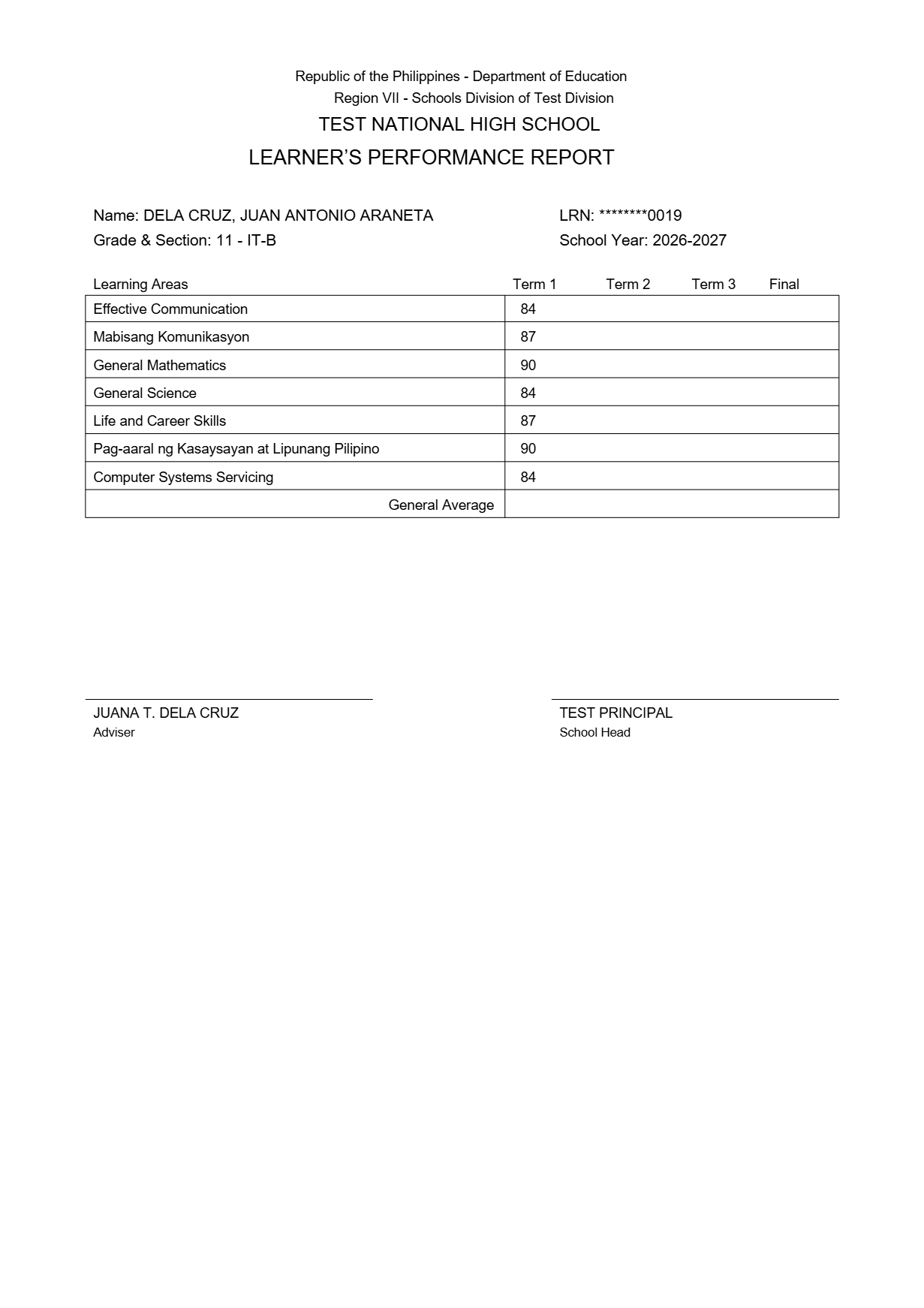
An SF9 page Formora filled in: Learner's Performance Report with Term 1 grades for seven subjects and a masked LRN.
SF9 · Grade 11 · IT-B

Isa-isang encode na naman?

The same grade travels from a teacher's sheet to the consolidated sheet, then to every SF9 and SF10. Each stop means typing it again, and every retype is a chance for a mistake on a report card.

Grades typed for one section · 40 learners, 8 subjects, one term

1,280

With Formora, 320. Each grade is typed once, by its teacher. Everything after is filled in.

  1. SF1 · LIS

    Class list

    40 learners, in DepEd order

  2. Grade sheet × 8

    Teachers encode

    40 learners × 8 subjects

  3. Consolidated

    You type them again

    Every grade, every subject

  4. SF9 × 40

    Again, card by card

    One report card per learner

  5. SF10 × 40

    Again, record by record

    One permanent record per learner

From SF1 to SF9, in one checked loop.

  1. Your class list, straight from the LIS.

    Import the SF1 you downloaded from the LIS. Match the columns, review the rows, and 42 learners are in, in DepEd order. LRNs stay masked.
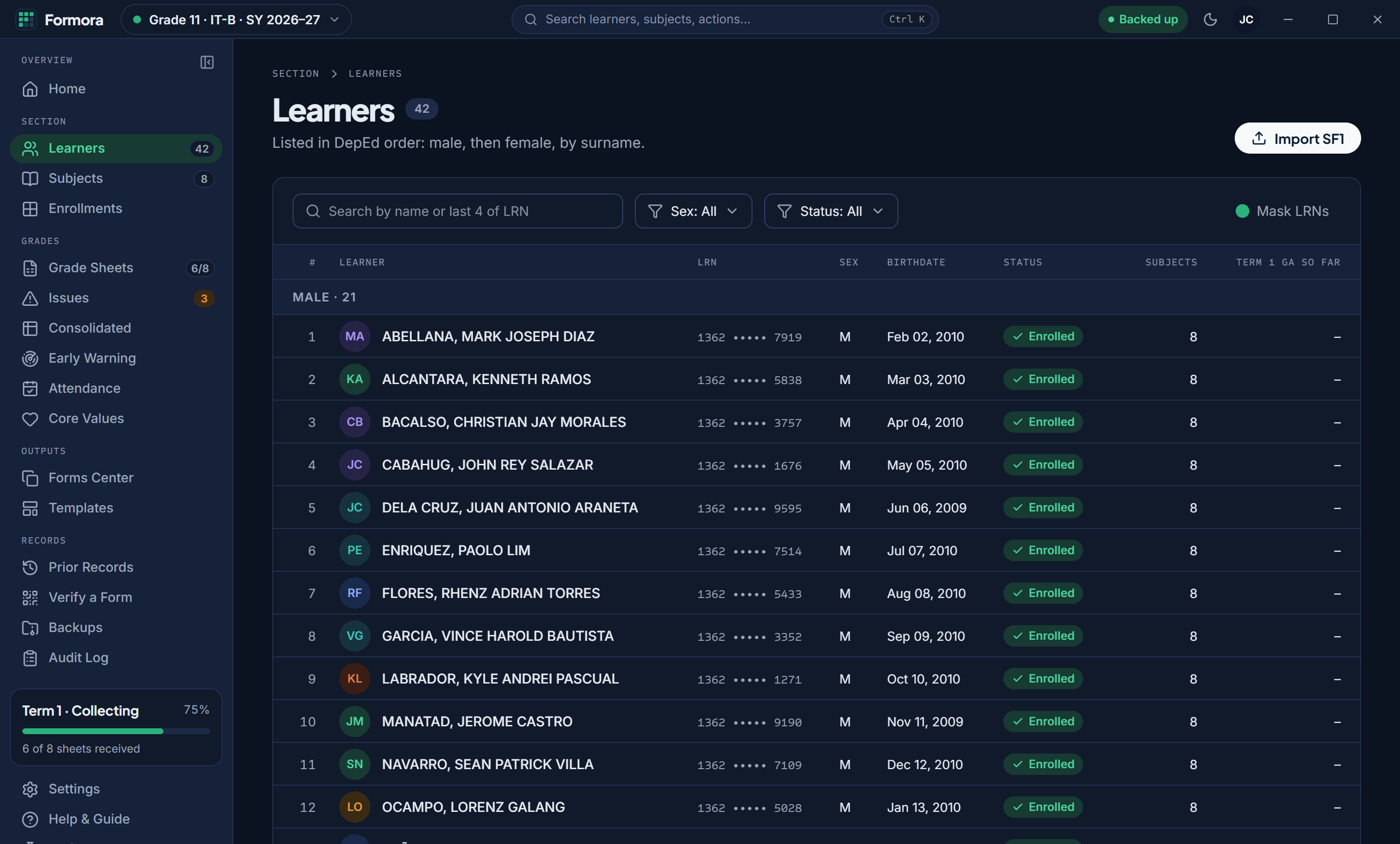
    The Learners screen: 42 learners in DepEd order, each LRN masked, all enrolled.
  2. A locked, signed sheet for every subject teacher.

    Formora makes one grade sheet per subject, with your learners already listed. Teachers fill in grades and send the file back. Nobody retypes a name.
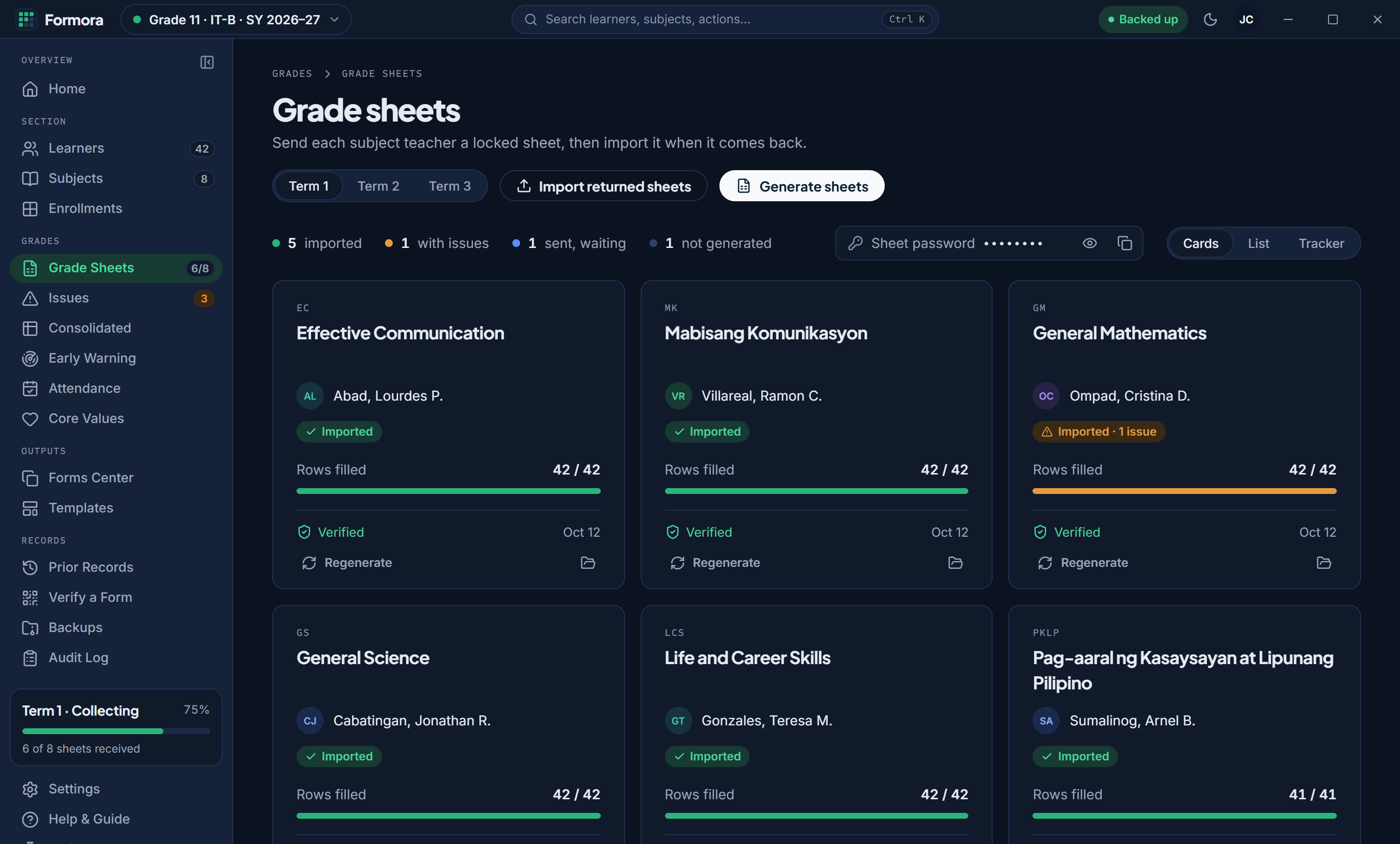
    The Grade sheets screen: a card for each subject with its teacher, rows filled and status.
  3. Mistakes caught before they reach a report card.

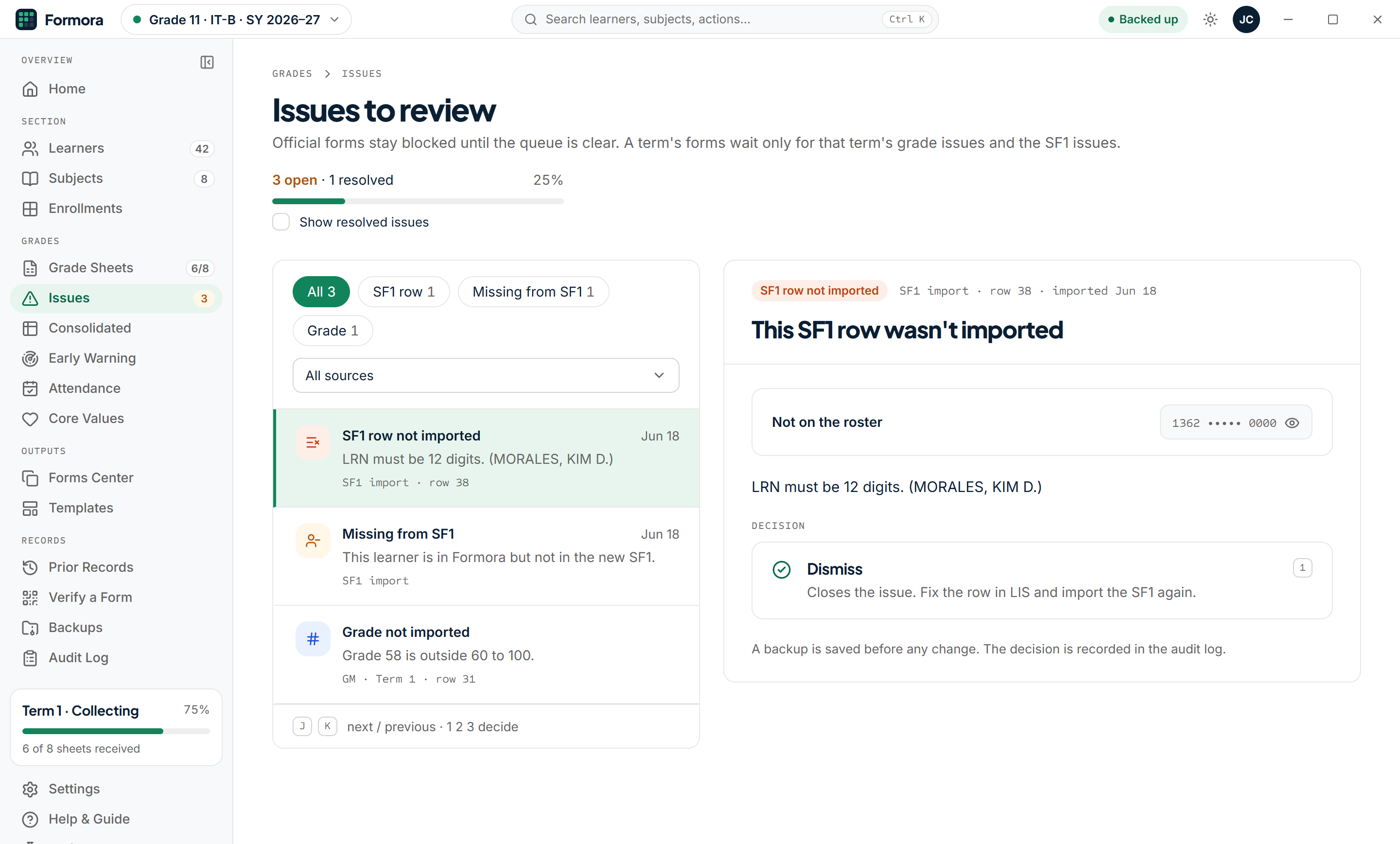
    Import the sheets as they come back. Formora checks each signature and every grade. A grade of 58 goes to the Issues queue, and forms stay blocked until the queue is clear.
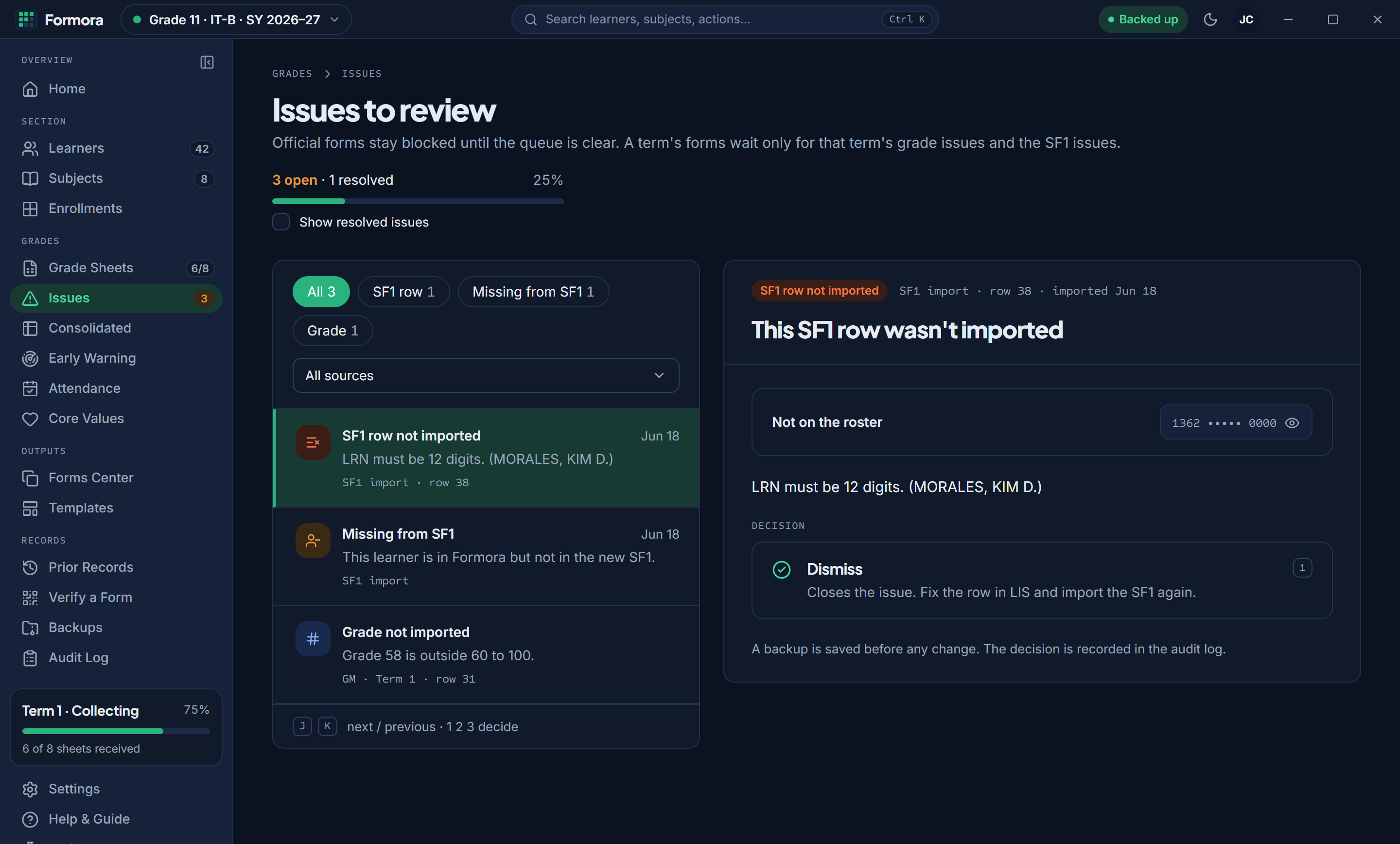
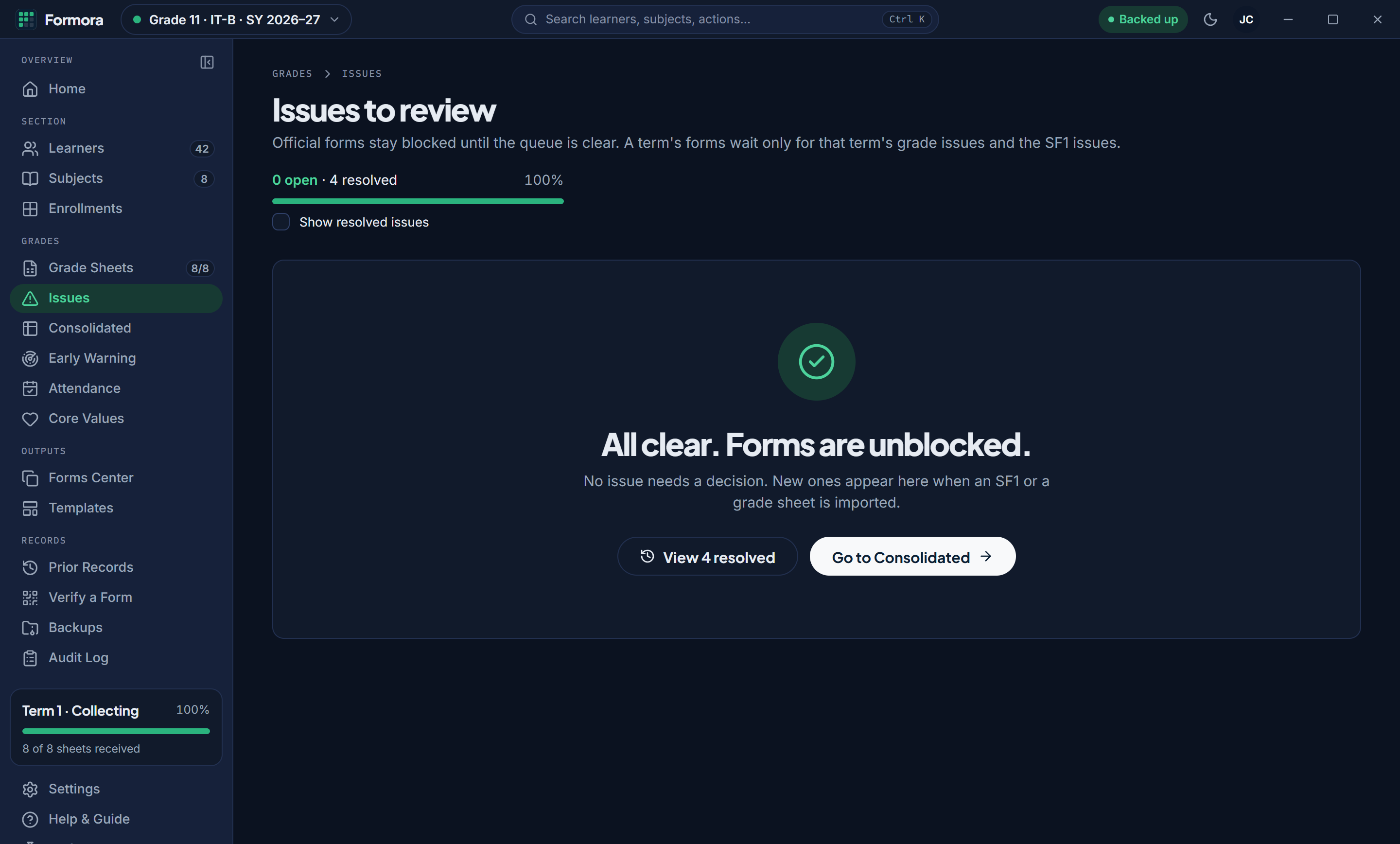
    The Issues queue with three open issues, including a grade of 58 outside 60 to 100.
    The Issues queue cleared: All clear. Forms are unblocked.
  4. Consolidated, SF9, SF10 and class cards. Done.

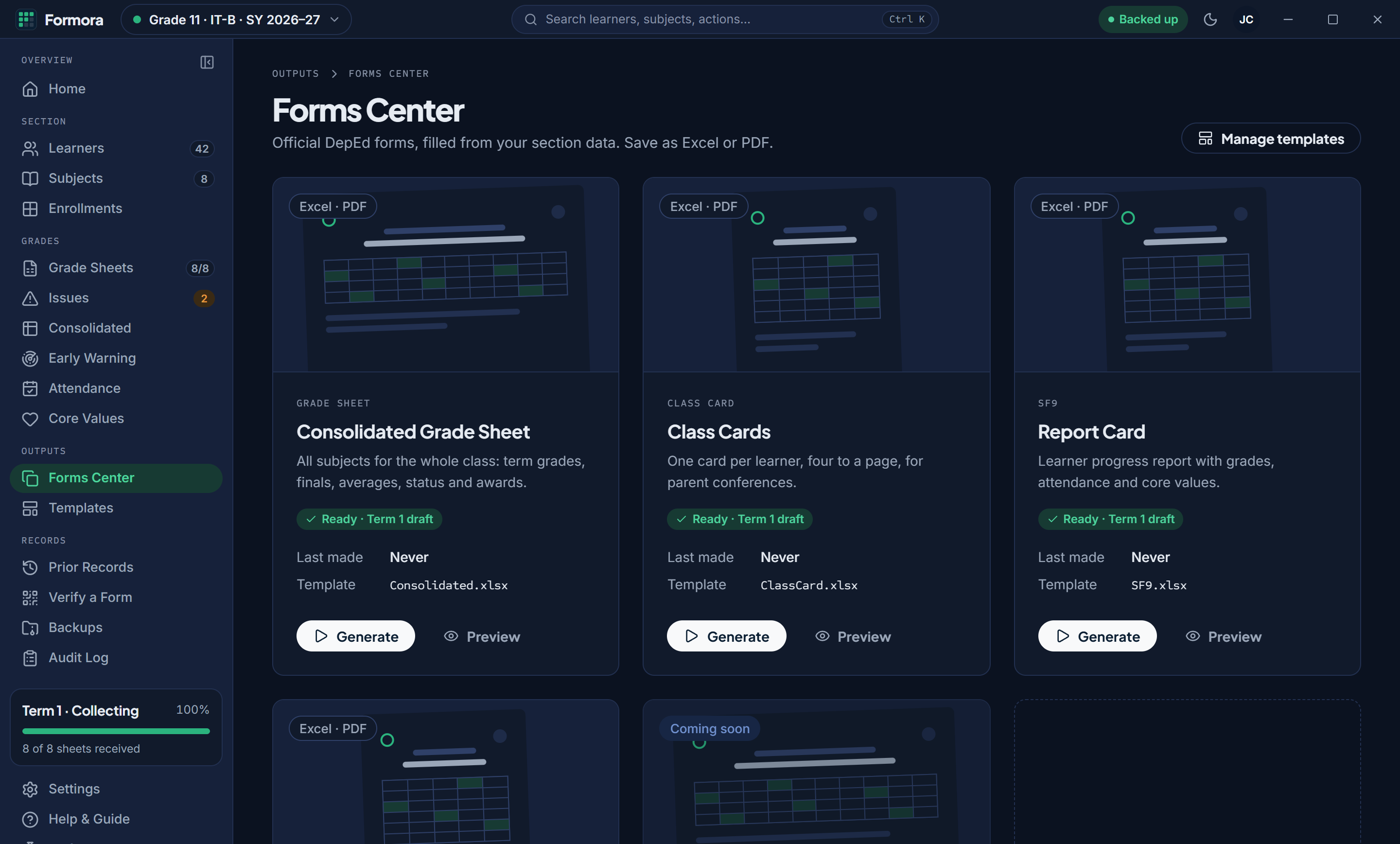
    Every form fills in from the same checked grades: the consolidated sheet, class cards four to a page, SF9 and SF10. Save each as Excel or PDF.
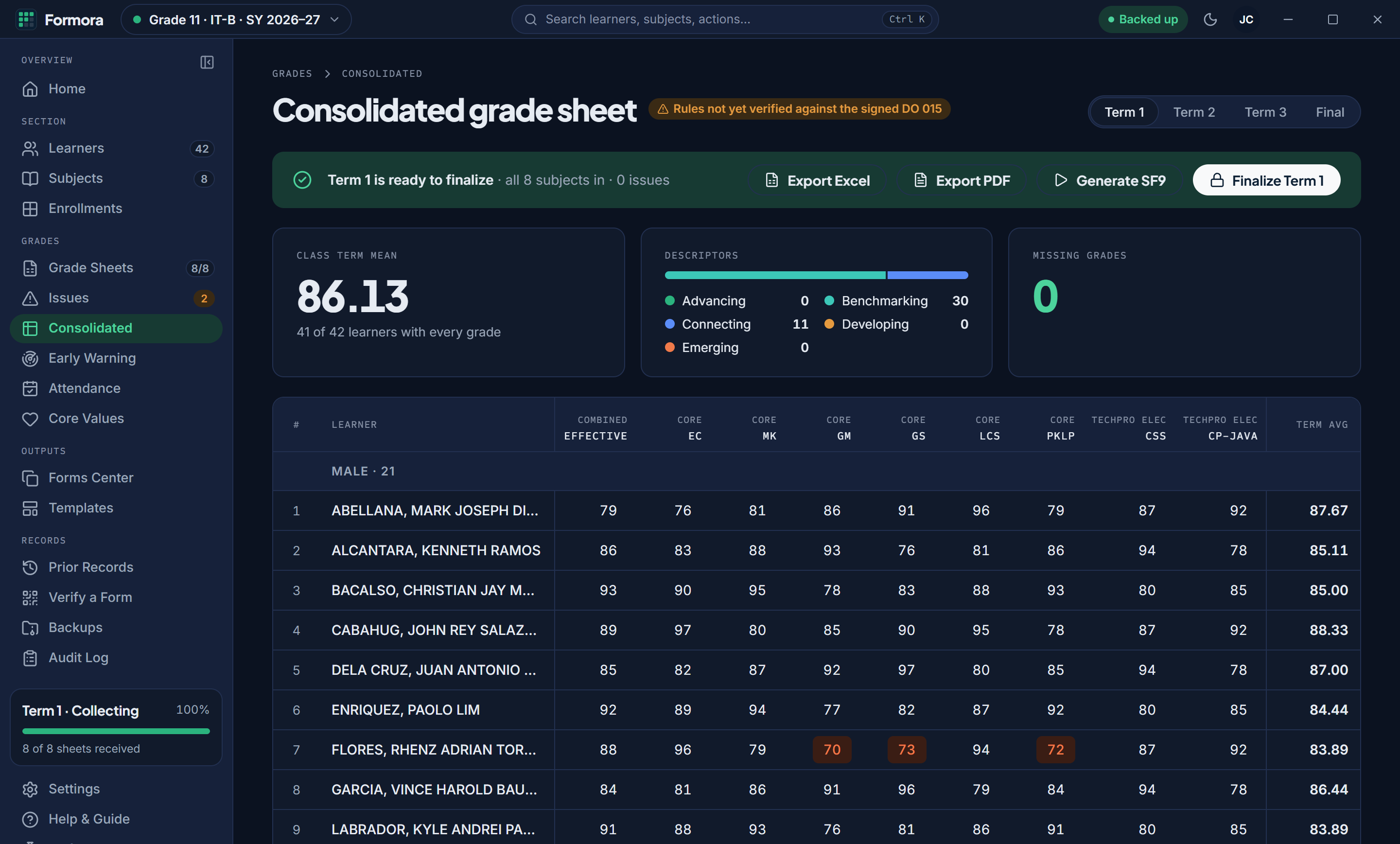
    The Consolidated grade sheet: all eight subjects for each learner with term averages.
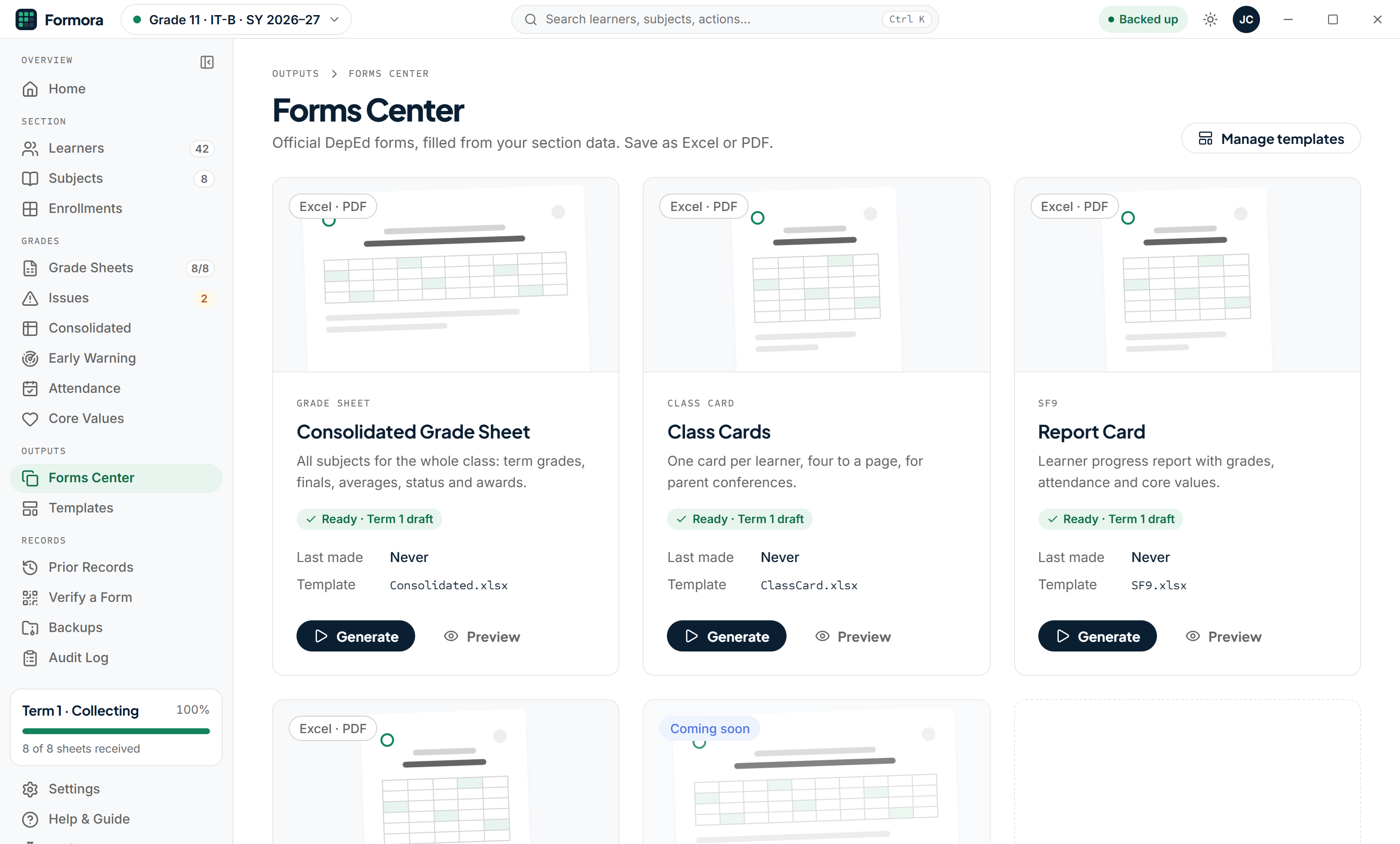
    The Forms Center: Consolidated grade sheet, Class cards and Report card, each ready to generate.

Your part is three steps.

  1. Import SF1

    Choose the SF1 file from the LIS (.xls, .xlsx or CSV). The file is read on your PC only.

  2. Send grade sheets, import them back

    Generate a sheet per subject, send it to the teacher, and import it when it comes back.

  3. Generate forms

    Pick the period and the learners, then make SF9s as one workbook, a PDF per learner, or one PDF to print.

A finished SF9 page: Learner's Performance Report for Grade 11 IT-B with Term 1 grades for seven subjects and a masked LRN.
An SF9 page Formora filled in from the checked grades. Invented learner, LRN masked.

Every form, from one place.

The Forms Center fills DepEd School Forms from your section's data. Save them as Excel or PDF, one file per learner or one combined file to print.

Consolidated
All subjects for the whole class: term grades, finals, averages, status and awards.
Class cards
One card per learner, four to a page, for parent conferences.
SF9
The report card with grades, attendance and core values.
SF10
The learner's permanent record, updated after each term is finalized.
The Forms Center: Consolidated grade sheet, Class cards and Report card, each marked Ready, with Generate and Preview.
Forms Center · Every form your section needs, each marked Ready when its grades are.
The Issues queue: an SF1 row not imported, a learner missing from SF1, and a grade of 58 outside 60 to 100.
Issues queue · A grade outside 60 to 100, a broken signature, a learner missing from the new SF1. Forms stay blocked until it's clear.
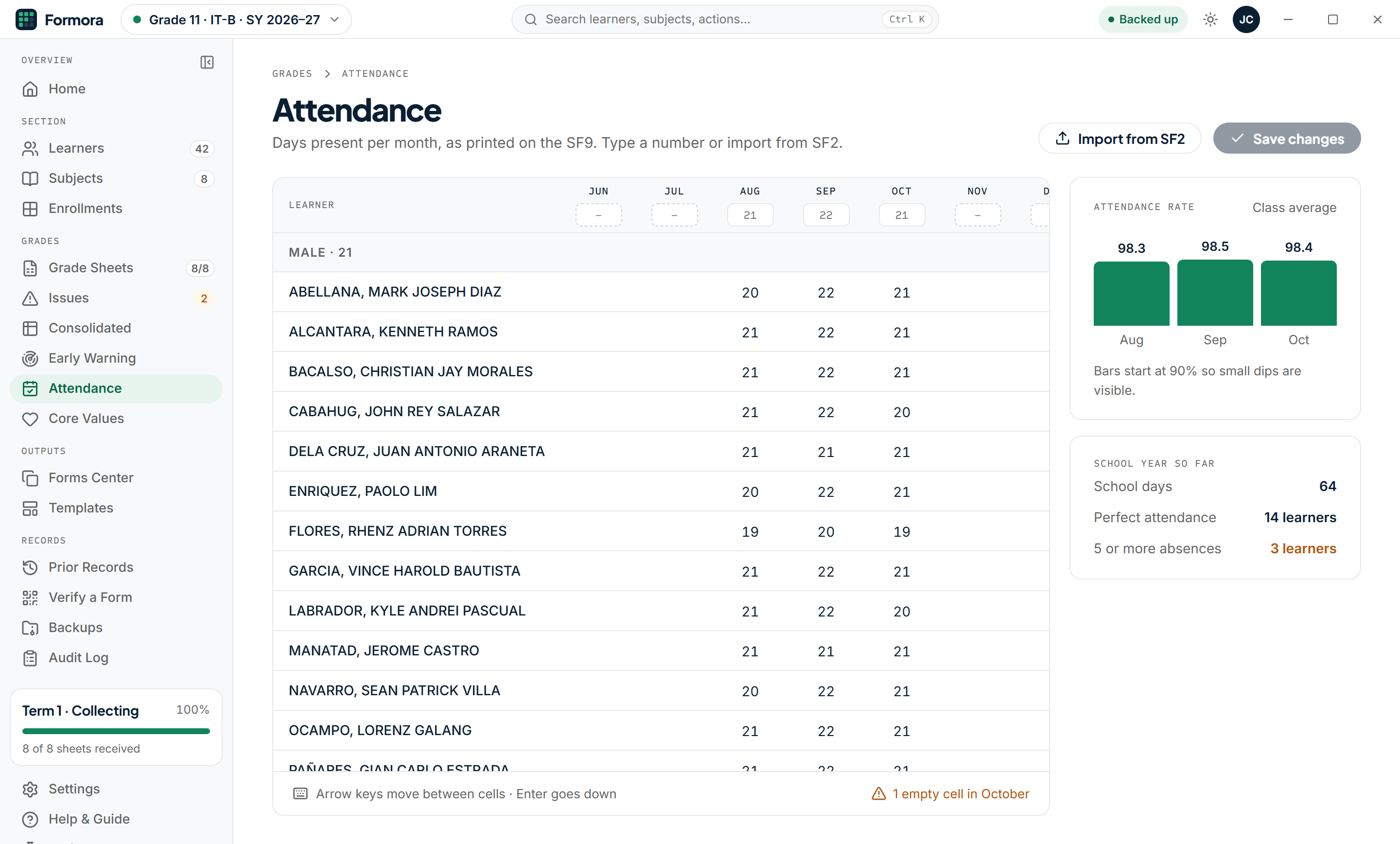
Attendance: days present per month for each learner, with an Import from SF2 button.
Attendance · Type days present per month, or import them from your SF2.
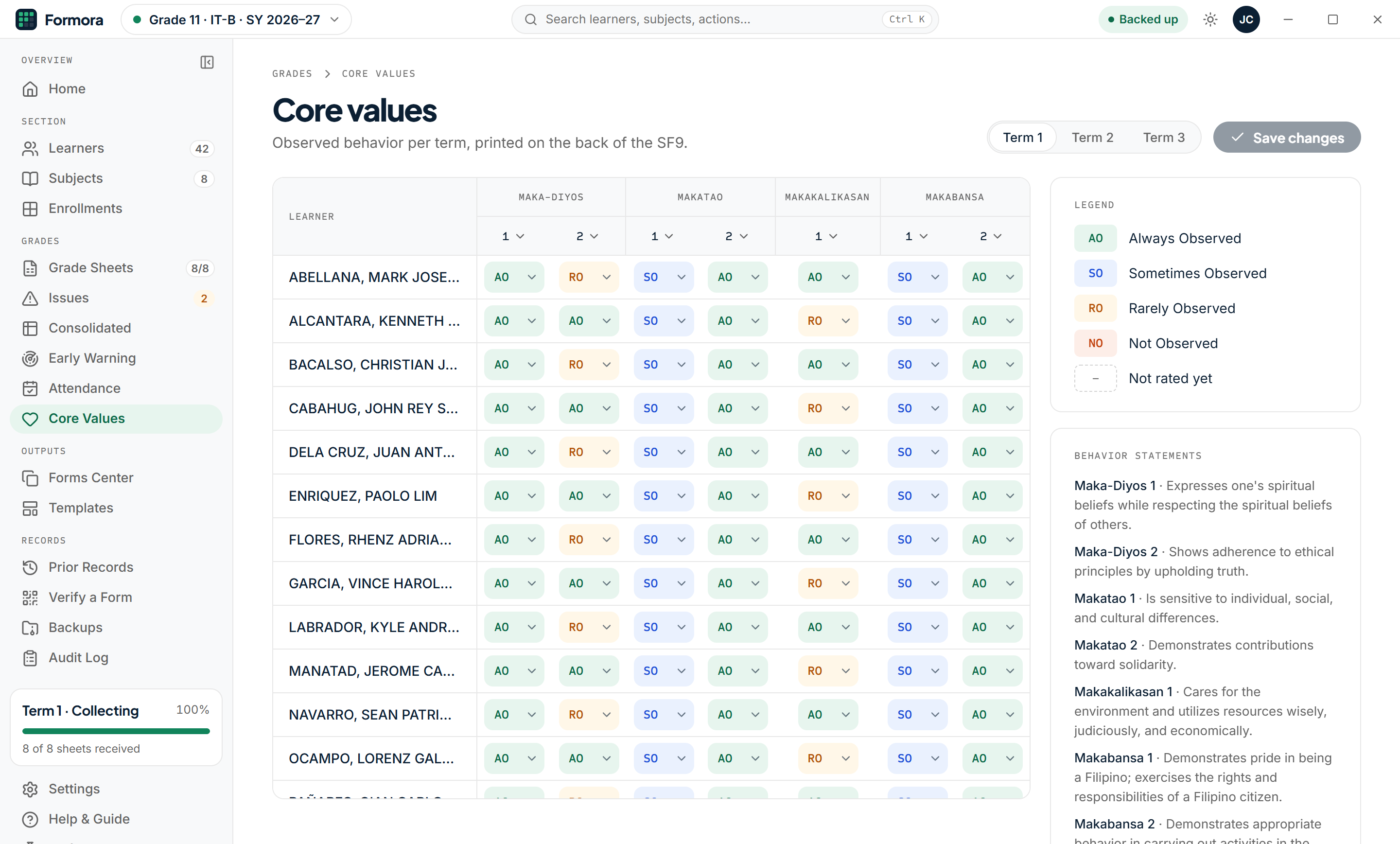
Core values: AO, SO, RO and NO ratings for each learner under Maka-Diyos, Makatao, Makakalikasan and Makabansa.
Core values · Rate each learner per term for the back of the SF9.

Your school's own layout.

Does your school use its own SF9 or class card layout? Install it as a template and Formora fills that instead. Each template is checked first so the grades land in the right cells.

Your learners' data stays with you.

Formora was built with the Data Privacy Act of 2012 (RA 10173) in mind. It keeps learner records on your own laptop, and we never receive them.

1362•••••0327

How every LRN shows in Formora, on screen and in the audit log.
  • Stays on your laptop

    Each section is one encrypted file on your PC. Learner data is never uploaded.

  • Works offline

    No account and no internet needed to encode, check or make forms.

  • Backups and restore

    Automatic backups before changes, a recovery key if you forget your password, and auto-lock when you step away.

  • Audit log

    Every change is recorded with who made it and when.

  • From the Excel version

    Already using Formora for Excel? Import your section into the desktop app.

What you need

Computer
A Windows PC or laptop
Excel
Microsoft Excel 2021 or Microsoft 365, for importing files and making forms. SF10 needs 2021 or later.
Files
Your SF1 from the LIS, and SF2 if you want attendance imported
In beta

Formora is in beta. It's built around an SHS adviser's real workload and tested on real forms with invented data. Expect rough edges, and tell us about them.

Questions advisers ask.

Something else? Email jeevierebiasv.3@gmail.com.

What do I need to run Formora?

A Windows PC and Microsoft Excel 2021 or Microsoft 365. Formora uses your Excel to read SF1, SF2 and the returned grade sheets, and to make the forms. SF10 needs Excel 2021 or later.

Which forms does it make?

The consolidated grade sheet, class cards (four to a page), SF9 and SF10. Save them as one Excel workbook, an Excel file or PDF per learner, or one combined PDF for printing.

Which files can I import?

The SF1 you download from the LIS (.xls, .xlsx or CSV), the grade sheets Formora made once teachers send them back (.xlsx), and your SF2 for attendance. Sections from Formora for Excel can be imported too.

Does it replace encoding?

Teachers still type their grades, once, into the sheet Formora makes for them. After that you don't retype them: the consolidated sheet, SF9, SF10 and class cards fill in from the imported sheets.

Can I use my school's own SF9 layout?

Yes. Install your school's template in Formora and it fills that layout. Each template is checked first so the grades land in the right cells.

Windows warned me when I opened the installer. Is it safe?

The installer isn't code-signed yet, so Windows SmartScreen may show "Windows protected your PC". Choose More info, then Run anyway. A signed installer will come before launch.

How is learner data handled?

Each section is one encrypted file on your laptop, protected by your password. Learner data is never uploaded and we never see it. LRNs are masked on screen and in the audit log, and backups stay on your PC.

Is it for Junior High too?

Not yet. Formora is for Senior High School: SSHS-2026 for Grade 11 and the K to 12 legacy curriculum for Grade 12. Junior High may come later.

Is Formora approved by DepEd?

No. Formora is an independent tool for DepEd School Forms. It isn't affiliated with or endorsed by DepEd.

How do I get access?

Join the free beta. We'll email you the download link and a short guide to get started.

Try Formora on your own section.

We're looking for SHS class advisers to use Formora this term. Fill in a short form and we'll send the download link.

Join the free beta

Free during the beta. We'll ask what worked after you use it on a real term, and beta testers receive a license key when Formora launches. Not in the beta? Every new install starts with a 30-day full trial.